Restaurant management system: what you actually need
What a restaurant management system really covers, which parts earn their keep at your size, and the order to switch them on. In baht, for Thai operators.
A restaurant management system is the software that covers seven jobs: taking the order, taking the money, telling the kitchen, knowing what stock you have, bringing the guest back, showing you the numbers, and doing all of it again at outlet two. You do not need all seven in month one. Start with the till and payments, add kitchen routing when tickets start going missing, add ordering channels when the floor is busy, and only add ingredient-level inventory once your food spend is big enough that one percentage point is real money. At ฿600,000 a month in sales, that point is ฿6,000.

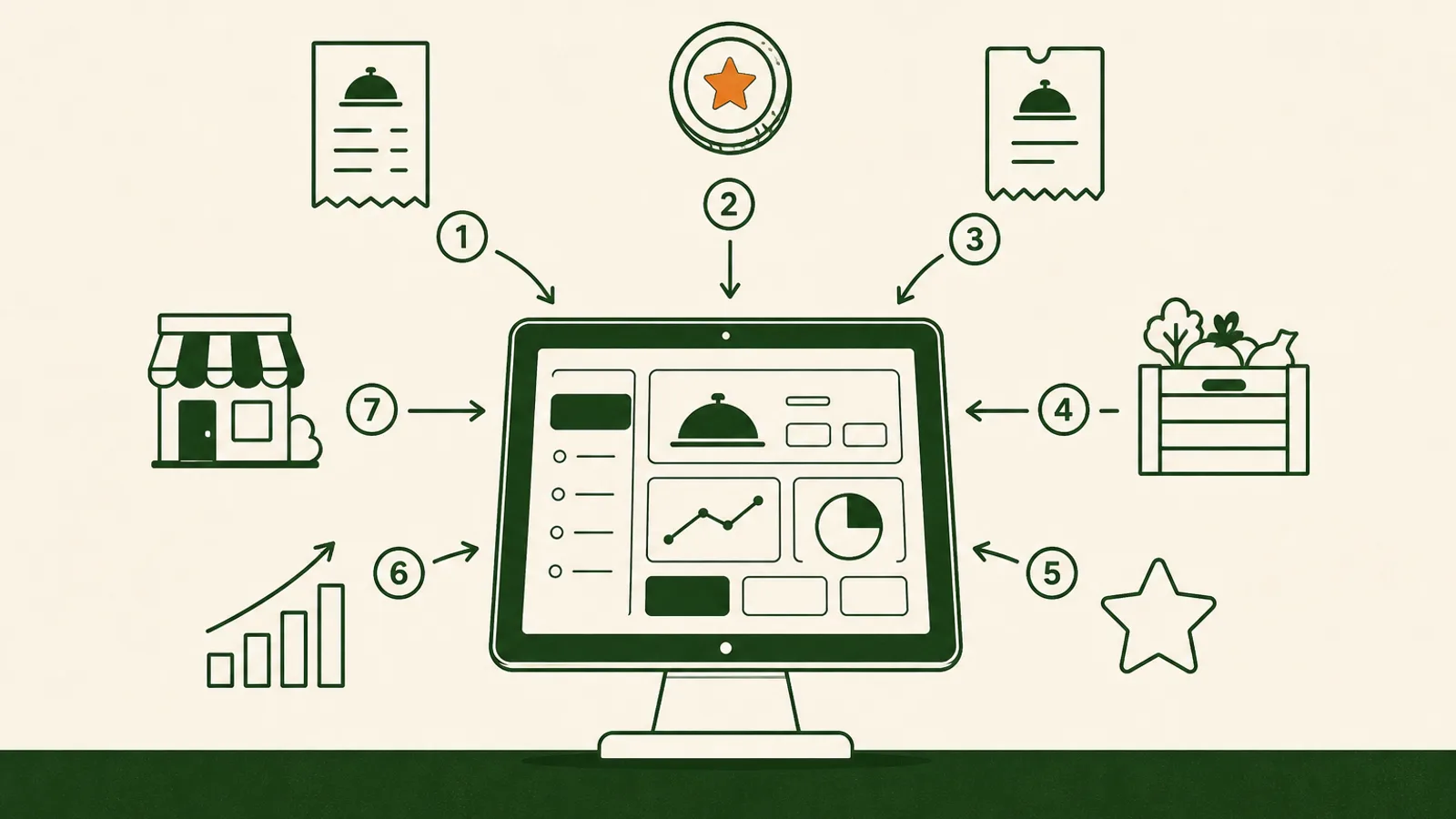
A restaurant management system is the software that runs everything in your restaurant except the cooking: the order, the money, the kitchen queue, the stock, the guest, and the numbers you look at on Monday morning. The phrase covers a lot of ground, which is why quotes for it in Thailand range from free to ฿8,000 a month per outlet. This guide splits the category into the seven jobs it actually has to do, says which of them earn their keep at which size of venue, and gives you an order to switch them on so a rollout does not stall halfway. All figures are in baht.
Timing is part of the argument. Krungsri Research expects food and beverage service revenue to grow 2.9 to 3.9 percent a year through 2028, and 946 registered restaurant companies closed in 2025, 9.9 percent more than the year before. Slow growth is survivable. Not knowing which dish, which shift or which outlet is losing money is what closes a restaurant.
The seven jobs a restaurant management system has to do
Strip the branding off every product in the category and you get the same list.
- Take the order. Counter, table, QR, delivery app, phone. All of them landing in one queue.
- Take the money. Card, PromptPay, wallets and cash, split bills, and a full tax invoice when the corporate table asks.
- Tell the kitchen. The right items to the right station, in the right order, with modifiers intact.
- Know what you have. Ingredient stock, recipes, wastage, goods received, what to reorder.
- Bring the guest back. Who your regulars are, what they order, a reason to return on a quiet Tuesday.
- Show you the numbers. Sales by hour, by item and by staff member, against cost.
- Do all of it again at outlet two. One menu, per-outlet prices, one roll-up report.
A till does the first two. Everything sold as restaurant management software is a claim about how many of the other five arrive in the same box, and how well they talk to each other once they do.
Restaurant management software versus a till
The dividing line is not features, it is whether the parts share data. A till records that you sold a green curry for ฿180. A management system records that the same sale took 320 grams of chicken and 80 millilitres of coconut milk out of stock, credited a loyalty account, closed table 12, and moved today's gross margin.
That distinction is worth nothing at a single counter with one person on shift, which is why we tell those operators to stay on a free POS. It starts paying when there are more moving parts than one person can hold in their head. Our POS buyer's guide covers the vendor questions in detail. The short version: ask which of the seven jobs are in the plan you were quoted, and which are paid modules. Two quotes that look ฿1,000 apart are often ฿4,000 apart once the modules are added.
Switch things on in this order
Rollouts fail from doing everything in one week, not from doing too little.
Week one: till, payments, menu. Nothing downstream is trustworthy if the sale is not recorded properly. Get the menu structure and modifiers right now, because recipes, channel pricing and reports are all built on top of it.
Weeks two to four: kitchen routing. Once the till is stable, fix how tickets reach the kitchen.
Month two: ordering channels. Add QR ordering and delivery when the floor is busy enough that the queue costs you covers, not before. Our multi-channel setup guide is the step-by-step.
Months three to six: ingredient inventory. Add Papaya Stock when your food spend is big enough to manage. Recipes need a stable menu, so this genuinely cannot come first.
Month six onward: loyalty, then the roll-up. Loyalty works once you have enough transaction history to know who your regulars actually are. Cross-outlet reporting matters the day outlet two opens.
Kitchen routing is the part that pays back fastest
This is the least glamorous item on the list and the one operators thank themselves for. When a floor gets busy, orders do not get lost in the POS, they get lost between the POS and the pass.
You have two options. A kitchen display system puts tickets on a screen at each station, with timers and a bump button, so nothing is bumped without someone touching it. Printers put paper at each station and cost far less. For one hot station and one cold station, printers are fine, and anyone who tells you a kitchen display system is mandatory at that size is selling hardware.
The feature that matters at both sizes is routing plus coursing. Routing sends drinks to the bar, grills to the grill and desserts to the pastry station from one order, automatically. Coursing holds the mains until the starters clear, so a table of six is not eating in three shifts. Papaya POS does both, with hold and fire on the ticket and a KDS on the plans that include it. Test it with your worst case: a table of eight, three courses, two modifiers and one allergy note.
Where money leaks when systems do not talk
The classic Bangkok setup is a POS on the counter, a delivery tablet next to it, a card terminal from the bank and a stock spreadsheet on somebody's laptop. Every one of those is fine on its own. The cost is at the joins.
Take 25 delivery orders a night typed into the POS by hand at 45 seconds each. That is about 19 minutes a night, roughly ten hours a month. At Bangkok's ฿400 daily minimum wage the wage cost is around ฿500 a month, which is not the problem. The problem is that those 19 minutes are all at peak, and the order typed wrong at 8pm costs a remake, a refund and a review.
Be sceptical of the word integration, including from us. On Papaya, Grab is a two-way integration and orders land in the same queue, Deliverect fronts several aggregators through one connection, and Lalamove dispatches your own drivers. LINE MAN, foodpanda and ShopeeFood are not native order sync today. Staff ring those up against their own tender so the day reconciles on one screen, which is useful and is not the same thing as an API. Ask every vendor which platforms push orders in by themselves and which ones a human still types. The answer changes the staffing maths more than any feature grid.
What it costs, and the maths that decides it
Papaya is priced per outlet, not per feature. POS plans are ฿1,490 for Starter, ฿2,490 for Pro and ฿5,000 for Pro Copilot per month. POS with Inventory is ฿1,490, ฿3,990 and ฿8,000. There is a 30-day free trial and no setup fee, and in Thailand the Starter and Pro plans include an EDC terminal and a printer, which changes the hardware total more than most quotes admit. Current numbers are on the pricing page.
Now do the two sums that decide it. First, the subscription against gross profit. At an average bill of ฿350 and a 65 percent gross margin, each bill contributes about ฿227, so ฿2,490 a month is 11 extra bills, roughly one extra table every three days. Second, the inventory plan against food cost. At ฿600,000 a month in sales, one percentage point of food cost is ฿6,000 a month, so the step from ฿2,490 to ฿3,990 pays for itself if ingredient tracking moves your food cost by a quarter of a point. Our food-cost playbook shows what that actually takes, and the break-even calculator does the covers-per-day version in a minute.
If neither sum clears comfortably, the honest answer is that you are early. Come back at the next bottleneck.
When one system is the wrong answer
Three cases where we are not the right call, said plainly.
A single counter. One till, one person, no table service, no second outlet. A free POS is the correct tool and our guide to free POS explains where free stops being free.
A booking-led room. Papaya Reservations is not shipped yet. If your covers arrive by reservation, keep the booking tool you have and connect it later.
A venue that wants a large app marketplace. Toast, Square and Lightspeed are older, better known and have deeper third-party ecosystems. That is a real advantage and worth weighing. Papaya fits better when you want QR self-ordering, table service, ingredient-level cost control and multi-outlet in one platform priced per location.
Six checks to run during a trial
Do these yourself, on your own menu, in a 30-day trial rather than a demo.
- Ring your five best sellers with real modifiers and time it.
- Fire a three-course table of eight and confirm the mains hold until you release them.
- Take one bill split three ways, one share on card and two on PromptPay.
- Pull the internet out for ten minutes, keep selling, then check what syncs back.
- Build one recipe to the gram, sell it five times, and see stock move without anyone touching a spreadsheet.
- Open the same day's numbers for two outlets side by side, even if you only run one today.
If all six are clean, the system will hold as you grow into it. If two of them need a workaround, that workaround becomes your staff's evening routine for the next three years.
Frequently asked questions
What is a restaurant management system?
It is the software that runs everything in a restaurant except the cooking: taking orders across the counter, the table, QR and delivery, taking payment, routing tickets to the kitchen, tracking ingredient stock, recording who your regulars are, reporting on all of it, and repeating that at each outlet. The term is loose, which is why quotes range from free to ฿8,000 a month per outlet. Judge any system on how many of those jobs it covers in one place, and how well the parts talk to each other.
Is a restaurant management system different from a POS?
In practice the POS is the part your staff touch, and the management system is the POS plus the back office around it: stock, recipes, loyalty, reporting and multi-outlet control. Most vendors now sell one thing and call it either name. What matters is the boundary of the box you are buying. Ask which of the seven jobs are included in the plan you were quoted and which are paid modules, because that is where two quotes that look ฿1,000 apart turn out to be ฿4,000 apart.
What order should a new restaurant turn features on in?
Till and payments first, in week one, because nothing else works if the sale is not recorded properly. Kitchen routing second. Ordering channels such as QR and delivery third, once the floor is genuinely busy. Ingredient inventory fourth, when food spend is large enough to be worth managing. Loyalty fifth, and cross-outlet reporting when the second outlet opens. Turning everything on at once is the most common reason a rollout stalls, because each stage needs the previous stage's data to be clean.
What does a restaurant management system cost in Thailand?
Papaya is priced per outlet: POS plans run ฿1,490 for Starter, ฿2,490 for Pro and ฿5,000 for Pro Copilot per month, and the POS plus Inventory plans run ฿1,490, ฿3,990 and ฿8,000. There is a 30-day free trial and no setup fee, and in Thailand the Starter and Pro plans include an EDC terminal and a printer. Compare on the total: subscription, payment processing rates, hardware, and any module priced separately.
Do I need one if I run one small shop?
Probably not yet. One counter, one person on shift, no table service and no second outlet is exactly the situation a free POS handles well, and we would rather say that than sell you something early. The honest trigger points are a second printer, table service, a stock spreadsheet living next to the till, or an outlet two. Until one of those shows up, the value case does not land.
Buy the next problem, not the whole roadmap
The demo will show you all seven jobs at once, because that is what makes the price look reasonable. Your restaurant does not experience them all at once. It experiences one bottleneck at a time: the queue at the counter, then tickets going missing, then delivery orders typed twice, then a food cost nobody can explain, then a second outlet you cannot see from home. Buy for the bottleneck you have this quarter, and check that the system can take the next one without a migration. That is the whole decision. A platform that covers all seven jobs is worth paying for when the sale you ring updates the stock, the guest record and the reports by itself. It is worth nothing if you are still going to run the spreadsheet anyway.
Break-even calculator
Find the covers per day you need to break even.
More on Getting started
Set Papaya up and get your restaurant running on it — the essentials, in order.