How to set up multi-channel ordering without double-entering orders
A step-by-step playbook for running dine-in, QR, takeaway and delivery from one menu and one screen — so the kitchen sees every order in one queue and your stock and reports stay in sync.
Running dine-in, QR, takeaway and delivery should not mean four screens and a person re-typing orders at the pass. Build one master menu, point every channel at one order stream and one kitchen queue, set channel pricing and availability centrally, and let every sale deplete the same stock. The goal is simple: no order is ever typed twice.

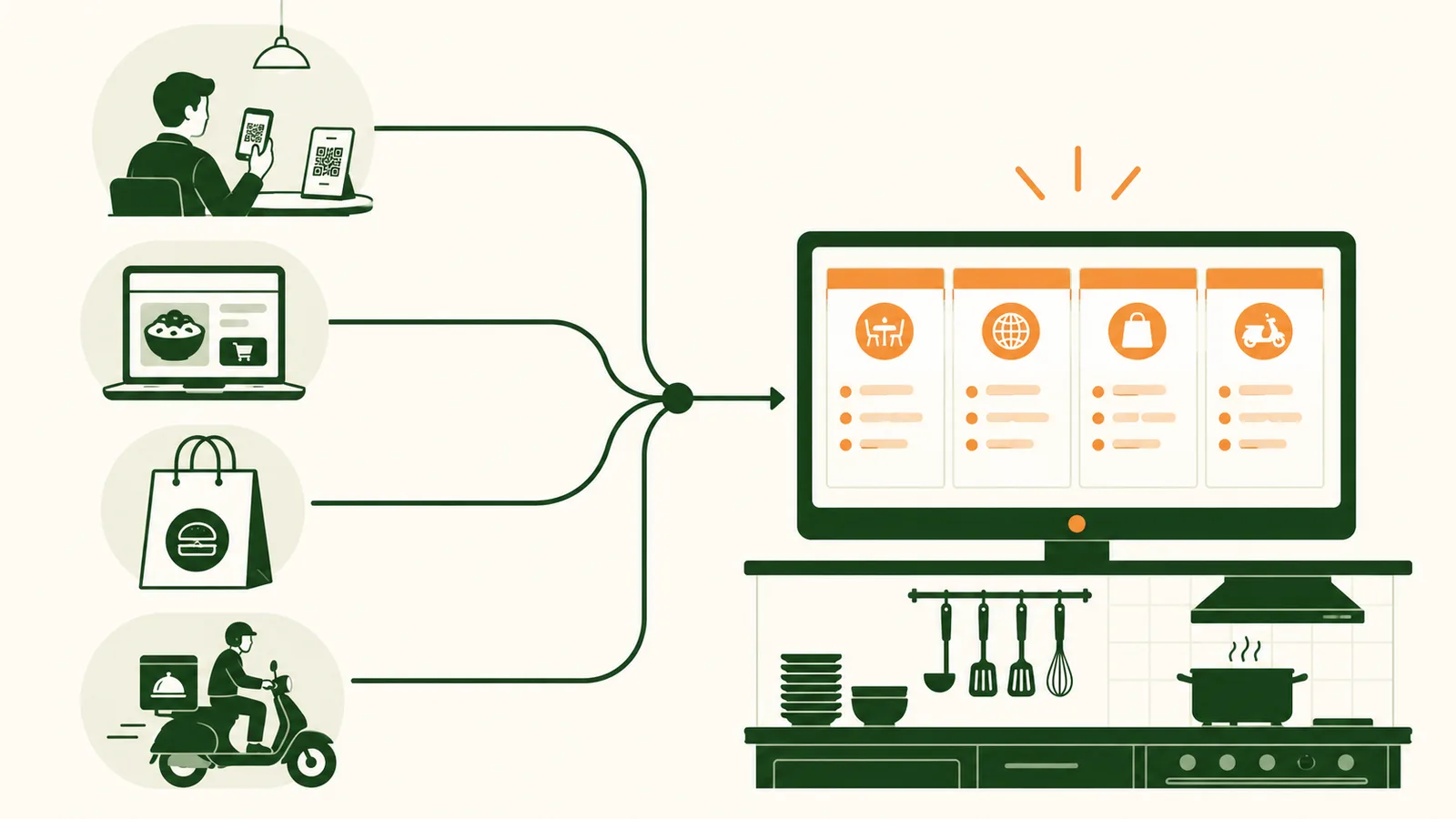
Most restaurants don't choose to run four ordering systems — it just happens. You start with a POS at the counter. Then guests ask for a QR menu, so you bolt one on. A delivery aggregator signs you up, so now there's a clattering tablet by the pass. Someone adds takeaway through a separate link. Suddenly your kitchen is reading orders off four screens, your stock count is fiction, and Friday night is a person standing at the pass retyping delivery orders into the POS.
The fix isn't fewer channels — guests want all of them. The fix is one menu and one order stream feeding every channel, so an order is an order no matter where it came from. Here's the sequence we walk operators through.
Why double-entry is the real enemy
Before the steps, name the problem properly. The cost of running channels separately isn't the subscription fees — it's the re-keying. Every order a human copies from a delivery tablet into the POS is a chance to fat-finger a quantity, miss a modifier, or forget to deplete stock. Multiply that by a busy service and you get wrong tickets, blown food cost, and reports nobody trusts.
The goal of multi-channel setup is to make sure no order is ever typed twice. If you get that right, everything downstream — kitchen flow, inventory, reporting, payouts — falls into place.
The five-step setup
1. Build one master menu
Everything starts here. You want a single menu that every channel reads from, not a copy per channel that drifts out of sync the first time you 86 an item.
For each item, capture it once and properly:
- Modifiers and options — the same "no peanuts" or "extra spicy" guests pick at the table should exist for QR and delivery.
- Prep station — tag whether it fires to grill, cold station or bar, so routing is automatic later.
- Recipe link — connect the dish to its ingredients now, so step 5 (stock) works without extra effort.
Then decide, per item, which channels it shows on. A whole-fish-for-the-table dish might be dine-in only; a packaged dessert might be the opposite. Set it once, centrally.
2. Connect your sales channels
With the master menu in place, switch on the channels that match how guests actually order from you:
- Dine-in POS for the floor and counter.
- QR / web ordering for seated guests who'd rather not flag a server.
- Takeaway for walk-up and call-ahead.
- Delivery aggregators (GrabFood and friends), ideally through one integration so you're not babysitting a separate tablet per platform.
The non-negotiable: every one of these must write into the same order stream. If a channel can only live on its own device, it'll become the one someone has to re-key — and you're back where you started.
3. Route every order to one kitchen queue
Now make the kitchen's life simple. Instead of four screens, send all channels to one kitchen display (or one printer setup), with each ticket clearly tagged by channel — DINE-IN T12, GRAB #4471, QR T7, TAKEAWAY.
The line then works one queue, in the order things actually need to fire, instead of context-switching between devices and missing the delivery order that's been sitting on a tablet across the room. Use the prep-station tags from step 1 so each ticket lands at the right station automatically.
4. Set channel-specific pricing and availability
Channels aren't priced the same, and that's fine — as long as you manage it in one place. A delivery item usually carries an uplift to cover the aggregator's commission; some items are channel-only; and when you run out of prawns at 8pm you want to 86 them everywhere at once, not on four menus by hand.
Set this centrally:
- A delivery price uplift applied as a rule, not retyped per dish.
- Channel-only visibility for items that don't travel well or don't belong on the floor.
- One "out of stock" toggle that hides an item on every channel the moment it's flipped.
5. Reconcile sales and stock across channels
This is the payoff. Because every channel wrote into one order stream against one menu with recipes attached, three things now happen on their own:
- Stock depletes once, correctly. A Pad Thai sold on delivery takes the same noodles and prawns off your on-hand as one sold at the table.
- Food cost stays honest. Your actual-vs-theoretical numbers cover all channels, not just dine-in, so you're not blind to where delivery margin is leaking.
- Reports and payouts line up. One sales report across channels, reconciled against what each aggregator actually paid you, so you can see channel mix and catch a short payout.
What "done" looks like
You'll know the setup is working when nobody on your team can tell you "which screen" a delivery order is on — because there's only one. The kitchen fires from a single queue, you 86 an item in one tap, and on Monday your report shows dine-in, QR, takeaway and delivery side by side with stock and food cost that actually reconcile.
That's the whole point of multi-channel: more ways for guests to order, none of them adding work for your team.
Frequently asked questions
Do I have to re-enter delivery orders into the POS?
No, that is the whole point. Connect each channel so orders write into one stream and fire straight to the kitchen. Re-keying is where wrong tickets, blown food cost and untrustworthy reports come from.
Can I charge different prices on delivery?
Yes. Apply a delivery uplift as a rule and set channel-only items or availability centrally, so you manage one menu instead of editing four by hand.
How does stock stay accurate across channels?
Because every channel writes against the same menu with recipes attached, a dish sold on delivery depletes the same ingredients as one sold at the table, so food cost and reorder points stay correct wherever the order came from.
One stream, every channel
Adding channels should add revenue, not work. The moment a delivery order has to be re-typed into the POS, you have inherited a second job — and every mistake that comes with it. Build one master menu, point every channel at one order stream and one kitchen queue, and manage pricing and availability centrally.
Do that and the payoff compounds on its own: stock depletes once, food cost stays honest across channels, and Monday's report reconciles without a spreadsheet. Start with the master menu, then connect one channel at a time.
More on Online & multi-channel ordering
Run dine-in, QR, takeaway and delivery from one menu and one kitchen queue.